Dynamic HTML: A term that refers to scripting language used for creating interactive websites, this includes HTML, CSS Java. It relies on using programming language to customise the page to create an interactive webpage. It runs faster than its counterparts as it does not need to load the full webpage in order for it to run properly, it also does not require any plug-ins to function as it is usable within browsers giving it good functionality and utility.
However it is fairly complex to integrate and edit, as it requires a fair amount of complex coding in order to properly function. It also rejects other browsers if it has been designed with a single one in mind.
Flash: The video format used by Adobe, it calculates images in vector format and then rendered as a raster image. This gives it a higher quality look when compared to regular raster images, since the quality of the pixels is dependent on the monitor. It allows for a great amount of customisation for interactivity than its fellow formats. It can give a website a professional look or add an amount of fun to a website, it is also compatible with multiple browsers.
But flash takes a lot longer to load than its counterparts, requiring your computer to download the flash files before you are able to view the site. This is off putting to a lot of people and could cause them to leave before viewing all your hard work. As such it is better not to use an excessive amount of flash for important business sites, otherwise you'll end up boring potential customers, the exact opposite of the sites intention. It requires you to download the flash player, although it is free.
Shockwave: A multimedia platform owned by Adobe prior to Flash, that is used to add interactivity to web pages It was designed to create web based movies and animations, it has also found a use in developing browser based games. It allows for more versatile and elaborate interactivity on your web pages and is able to use a wider range of file types such as Flash, but this does not work the other way around. However it is considered more expensive than Flash, it also requires a lot of technical know how in order to fully utilise its capabilities.
QuickTime: Multimedia framework initially developed for Windows XP and Mac OS, it is capable of handling digital video, images and interactivity. The format is completely free to use and does not require it to be downloaded. Speaking of things that don't need to be downloaded , QuickTime allows you to watch a video before its finished downloading, a great convenience for the viewer. However since QuickTime is a streaming format, the quality of its performance is based on your broadband connection, meaning anyone with a poor connection to the Internet will have problems with their loading speeds.
Real-player: A cross platform media player for recorded media. It allows its user to use any video player they see fit and is fast and easier to install than Quicktime. But it also displays a lot of annoying advertisements in the form of pop-ups, that and the fact that other people have to download the application to use it make it not that popular.
Thursday, 9 May 2013

Tuesday, 7 May 2013
Types of Animation (P1)
 |
| footage old an old Victorian rotoscope. |
Movement
What the animation depicts when in motion. Animation, (or
any filmed motion) is at its core just a set of pictures being shown one after
the other, at such a pace that it creates the illusion of movement.
 |
| A making effect used by pixar to make 3D images on 2D characters. |
Masking
 |
| An example of morphing |
Morphing
Morphing is an effect that turns one image into another
seamlessly. It was first used in the motion picture film The Golden child in
1986. It is a computer effect that was mostly used for transformation
sequences.
Tuesday, 30 April 2013
Advantages and disadvantages of gifs (P3)
Gifs primarily used as a file compression format allows images to be compressed into very small file sizes. It offers lossless file compression, but has a limited colour palette causing some areas to become gray.
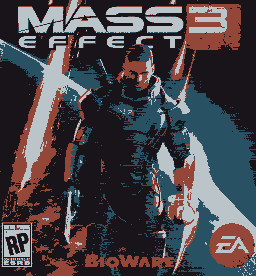 |
| Here this box art has been compressed to the point where it can only support four colours. |
 One other use is for animated images, this is done by placing images in a sequence to create the illusion of movement (So just like regular animation). This is very popular on internet image boards as they are self playing and do not require the use of a video player. They are on the other hand fairly limited in their complexity due to its limited file size and colour, it can only ever render 256 colours at a time. They are also capable of transparent backgrounds.
Monday, 29 April 2013
Animating for the web (P5, M3)
And the things to consider.
Rollovers - Rollover animations allow objects on the page to be interacted with simply by rolling the mouse over them. This can be used on images, text and buttons, and opens up a number of options to customise the page with more interesting visuals.
A downside to
this is how well they integrate with tablets or mobile phones, which is not
good at all. Since tablets uses a touch screen interface the concept of simply
rolling over the image doesn't work at all. This is less of a problem for drop down
menus that are activated by rolling over as tapping them usually suffices but more elaborate options may be a problem.
Animated attachments - A good way of advertising your product would be to send an email with some kind of animation attached, this is a good idea in theory because emails can be sent to multiple people at once, if it is an entertaining animation they could forward it to people they know and there you have an easy form of viral marketing. But with all the worries of dangerous attachments sent from emails there is a chance that your email will be either deleted or simply marked off as spam. But nowadays companies would much rather spend their time hosting these on trusted video hosting sites like Youtube or Viemo.
E-Cards - Designed as a healthy alternative to paper, e-cards are customisable cards that can be sent from person to person whatever the occasion. They were once popular but have been falling out of favour for some people, these days I've only ever seen them written with passive aggressive messages on them for dumb Internet "humour".
Output Devices - When making animations and of the such, you should remember that not everyone is going to be viewing it through a 1280x960 monitor. As such you should consider what size would be suitable for multiple screen sizes. While we're on the subject of finding a balance...
File size - It is important to make sure that when you upload your animation that the file size isn't to big. Failure to consider this could lead to such problems as long loading times and less than sufficient performance, this is also necessary if you were animating web banners which have a minimum of 50kb. But there are ways to minimize file size while your work doesn't suffer:
- Auto-crop - deletes any unwanted pixels that may be taking up memory; doing this lowers the overall amount of pixels that make up the picture, thus it will also cause finer details to suffer.
- Frame disposal - deletes the last frame before the next one plays, to my knowledge there are no side effects to this.
- Lower the bitrate by compressing the file, doing so will cheapen the quality so you need to strike a balance.
- Decreasing your colour depth will help lower the file size as it gives it less colours to process; however incessant use of this tool will cause the picture to turn monochrome, unless that is what you're looking for.
Subscribe to:
Posts (Atom)